Deduplication
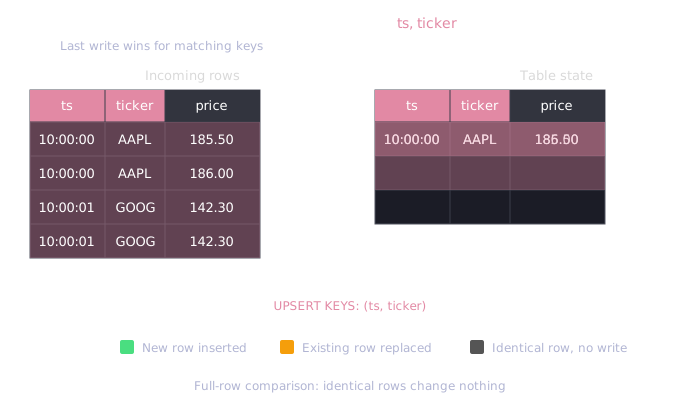
Deduplication keeps one row for each combination of key columns in a
WAL table. When a new row matches a stored
row on every key column, the table's mode decides which row survives: UPSERT
replaces the stored row with the new one, and SKIP keeps the stored row and
discards the new one. In both modes, clients can retry, resend, or reload data
without creating duplicate rows.
When to use deduplication
Use deduplication when:
- You need idempotent writes (safe to retry or resend data)
- You're reloading data that may have changed (e.g., third-party data feeds)
- You want one row per key, keeping either the latest write (
UPSERT) or the first one (SKIP) - You're recovering from ingestion errors and need to resend a time range
Leave deduplication off when:
- Your timestamps are always unique (no duplicates possible)
- You're doing append-only logging where duplicates are acceptable
- Write performance is critical and you're certain duplicates won't occur
Quick example
CREATE TABLE prices (
    ts TIMESTAMP,
    ticker SYMBOL,
    price DOUBLE
) TIMESTAMP(ts) PARTITION BY DAY
DEDUP UPSERT KEYS(ts, ticker);
With this configuration, each (ts, ticker) combination can have only one row:
INSERT INTO prices VALUES ('2026-01-15T10:00:00', 'AAPL', 185.50);
INSERT INTO prices VALUES ('2026-01-15T10:00:00', 'AAPL', 186.00);  -- replaces previous

SELECT * FROM prices;
| ts | ticker | price |
|---|---|---|
| 2026-01-15T10:00:00 | AAPL | 186.00 |
Only the last value is kept. With DEDUP SKIP KEYS(ts, ticker), the second
insert is discarded and the price stays at 185.50.
UPSERT and SKIP modes
Every deduplicated table has one mode, which applies to all its key columns. The two modes share the key rules and differ in which row survives when a new row matches a stored row, or an earlier row of the same commit, on every key column:
UPSERT | SKIP | |
|---|---|---|
| A new row matches a stored row | Replaces the stored row | Is discarded |
| Duplicates within one commit | The last row is kept | The first row is kept |
| Rule | Latest write wins | First write wins |
| PostgreSQL equivalent | INSERT ... ON CONFLICT DO UPDATE | INSERT ... ON CONFLICT DO NOTHING |
Write order is the order in which transactions commit to the table, then the
row order within a transaction. When several connections write the same key,
the first transaction to commit wins under SKIP, and the last one under
UPSERT.
Use UPSERT when the newest delivery is the correct one, such as vendor
restatements, corrected prices, or snapshot reloads. Use SKIP when the first
delivery must not change: audit records, or a column that records when a row
first arrived, which UPSERT would overwrite every time a feed resends the row.
CREATE TABLE quotes (
    timestamp TIMESTAMP,
    symbol SYMBOL,
    bid DOUBLE,
    ask DOUBLE,
    received_at TIMESTAMP
) TIMESTAMP(timestamp) PARTITION BY DAY
DEDUP SKIP KEYS(timestamp, symbol);

INSERT INTO quotes VALUES
  ('2026-01-15T10:00:00', 'EURUSD', 1.0841, 1.0843, '2026-01-15T10:00:01');
-- the feed resends the quote the next day
INSERT INTO quotes VALUES
  ('2026-01-15T10:00:00', 'EURUSD', 1.0841, 1.0843, '2026-01-16T09:00:00');

SELECT * FROM quotes;
| timestamp | symbol | bid | ask | received_at |
|---|---|---|---|---|
| 2026-01-15T10:00:00 | EURUSD | 1.0841 | 1.0843 | 2026-01-15T10:00:01 |
With DEDUP UPSERT KEYS(timestamp, symbol), received_at would read
2026-01-16T09:00:00.
How it works
When deduplication is enabled, QuestDB:
- Matches each incoming row against stored rows, and against earlier rows of the same commit, on all key columns
- Inserts a row that matches nothing
- With
UPSERT, compares a matching row with the stored row: a row with different values replaces it, an identical row changes nothing - With
SKIP, discards a matching row without comparing the other columns
Performance
Deduplication has minimal overhead when:
- Timestamps are mostly unique across rows
- Data arrives in roughly time-ordered fashion
Deduplication is more expensive when:
- Many rows share the same timestamp
- Deduplication keys have high cardinality
Comparing full rows reduces write amplification when reloading large datasets
where only a small portion has changed, which is common with third-party data
feeds that provide full snapshots. When every row that a native partition
receives is identical to a stored row, UPSERT leaves the partition as it is.
SKIP does not compare the columns outside the key, so it does less work per
duplicate. When every row that a partition receives is a duplicate, SKIP
leaves the partition as it is, whatever values the duplicates carry. This
includes Parquet partitions, where SKIP decodes only the designated timestamp
and the key columns to find the duplicates.
Configuration
Create table with deduplication
CREATE TABLE prices (
    ts TIMESTAMP,
    ticker SYMBOL,
    price DOUBLE
) TIMESTAMP(ts) PARTITION BY DAY
DEDUP UPSERT KEYS(ts, ticker);
Write DEDUP SKIP KEYS(ts, ticker) to keep the first row instead. The
designated timestamp must always be included in the key list.
CREATE TABLE AS SELECT accepts the same clause, and CREATE TABLE LIKE
copies the keys and the mode of the source table.
Enable on existing table
ALTER TABLE prices DEDUP ENABLE UPSERT KEYS(ts, ticker);
Switch between UPSERT and SKIP
Run DEDUP ENABLE again with the other mode. You don't need to disable
deduplication first, and stored rows are not rewritten:
ALTER TABLE prices DEDUP ENABLE SKIP KEYS(ts, ticker);
Each transaction applies with the mode in effect when it was committed: rows
committed before the ALTER follow the old mode, and rows committed after it
follow the new one.
Change the key columns
ALTER TABLE prices ADD COLUMN exchange SYMBOL;
ALTER TABLE prices DEDUP ENABLE UPSERT KEYS(ts, ticker, exchange);
The statement replaces both the key list and the mode, so repeat the mode you want to keep.
Disable deduplication
ALTER TABLE prices DEDUP DISABLE;
Disabling removes the keys and the mode. Rows already stored are not changed.
Checking configuration
SHOW CREATE TABLE prints the mode and the key columns in its DEDUP clause:
SHOW CREATE TABLE prices;
CREATE TABLE 'prices' (
    ts TIMESTAMP,
    ticker SYMBOL,
    price DOUBLE
) timestamp(ts) PARTITION BY DAY
DEDUP UPSERT KEYS(ts,ticker);
Check if deduplication is enabled. The dedup column is true in both modes:
SELECT dedup FROM tables() WHERE table_name = 'prices';
Check which columns are keys. The column is named upsertKey in both modes:
SELECT "column", upsertKey FROM table_columns('prices');
Count the rows deduplication has removed since the server started. A duplicate
counts in either mode, even when it is identical to the stored row and UPSERT
changes nothing:
SELECT table_name, wal_dedup_row_count_since_start
FROM tables()
WHERE table_name = 'prices';
Requirements
- Deduplication requires WAL tables
- The designated timestamp must be included in the key list
- Enabling deduplication does not deduplicate existing data, only new inserts.
If a table already holds duplicates, a new row with the same keys overwrites
each of them under
UPSERT, so the same number of rows remains, all with the new values. UnderSKIP, the new row is discarded and the stored duplicates stay as they are
Compatibility with earlier versions
QuestDB versions before 10.2.0 and QuestDB Enterprise versions before 4.2.0,
including replicas that still run such a version, do not recognize the SKIP
mode:
- They deduplicate a
SKIPtable asUPSERT, without an error. After a downgrade, later duplicates replace the stored rows. - They cannot apply a logged
ALTER TABLE ... DEDUP ENABLE SKIPand suspend the table. A loggedDEDUP ENABLE UPSERTstays readable by them.
In a replicated cluster, upgrade every node, replicas first, before you use
SKIP. See
Replication: upgrade order.