QuestDB Storage Engine
Storage engine
The QuestDB Storage Engine implements a row-based write path for maximum ingestion throughput and a column-based read path for maximum query performance. Table storage can be configured to use the QuestDB native binary format or to combine the QuestDB binary format for recent data with Parquet for older partitions. We refer to this model as a three-tier storage model.
Tier One: Parallel Write-Ahead Log
-
Two-phase writes: All changes to data are recorded in a Write-Ahead Log (WAL) before they are written to the database files. This means that after a crash the database can recover to a consistent state by replaying the log entries. To survive a power failure, the log must also be flushed to the disk, which the
syncandadaptivecommit modes do. -
Commit and write separation: By decoupling the transaction commit from the disk write process, a WAL improves the performance of write-intensive workloads, as it allows sequential disk writes, which are generally faster than random ones.
-
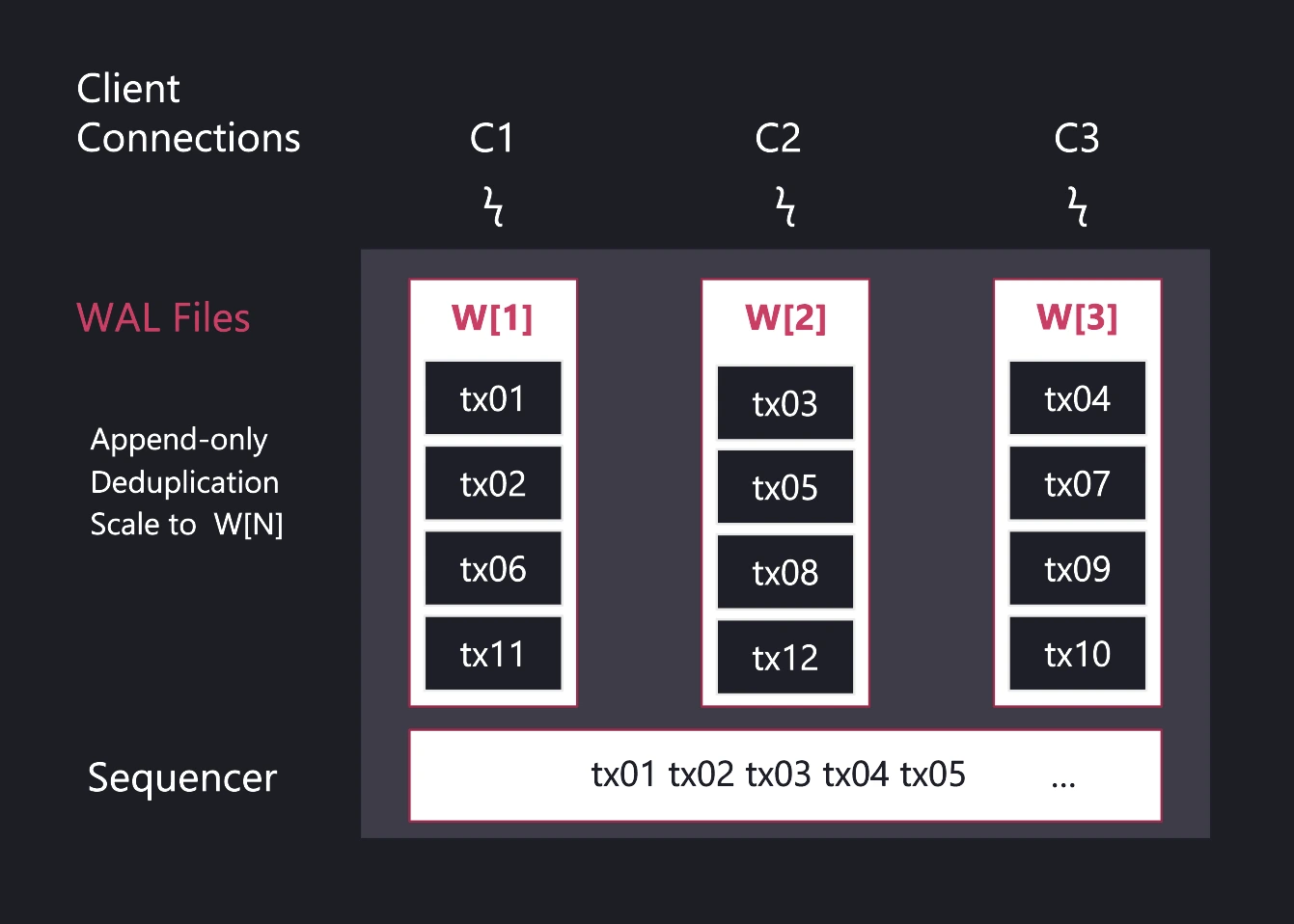
Per-table WAL: WAL files are separated per table, and also per active connection, allowing for concurrent data ingestion, modifications, and schema changes without locking the entire table.
-
WAL consistency: QuestDB implements a component called "Sequencer," which ensures that data appears consistent to all readers, even during ongoing write operations.
Tier Two: Local Table Storage
Changes in the parallel WAL files are stored on local disk in columnar format by the TableWriter. The TableWriter also handles and resolves out-of-order data writes and enables deduplication. Column files use an append model. Opt-in merge-append partitions reduce the copying needed for backdated writes by keeping untouched pieces in place; compaction later reclaims the superseded rows.
By default, the active (most recent) partition for each table is stored in QuestDB's native binary format for minimum query latency and to optimize writes in the event of out-of-order data or when updating sampling intervals in materialized views.
Locally, a partition can be stored in either of two formats:
- QuestDB native binary format (the default): the append-friendly columnar format used for all partitions unless configured otherwise.
- Parquet: a compressed, interoperable format for historical partitions. Parquet partitions remain fully available for queries, users don't need to know whether a partition is native or Parquet, and all QuestDB data types can be converted to Parquet.
A table's partitions can become Parquet in three ways:
- By default at creation, or via ALTER: store partitions as Parquet with the
FORMAT PARQUETclause onCREATE TABLE, or switch an existing table withALTER TABLE SET FORMAT. - Manually, per partition: convert individual partitions in place with in-place Parquet conversion.
- Automatically, as partitions age: convert on a schedule with storage policies (QuestDB Enterprise).
Tier Three: Remote Object Storage
The third tier moves historical Parquet partitions off local disk into a remote store (such as S3, Azure Blob, or GCS in the cloud, or NFS for on-premise deployments), reducing the local storage footprint. These remote partitions remain directly queryable from QuestDB with SQL, exactly as if they were stored locally, and the primary and all replicas share the same object storage.
In QuestDB Enterprise this is automated through cold storage, driven by the TO REMOTE and DROP REMOTE stages of a storage policy. A partition is uploaded as Parquet, sealed as read-only, and then evicted from local disk, keeping only its metadata and symbol indexes locally so that queries fetch just the column chunks they need.
Once partitions are in object storage, they can be catalogued into data lakes, for example through Hive partition registration, an Iceberg catalog, or a DuckLake catalog.
Tier One: Hot ingest (WAL), durable by default
Incoming data is appended to the write-ahead log (WAL) with ultra-low latency. Writes are made durable before any processing, preserving order and surviving failures without data loss. The WAL is asynchronously shipped to object storage, so new replicas can bootstrap quickly and read the same history.
Tier Two: Real-time SQL on live data
Data is time-ordered and de-duplicated into QuestDB's native, time-partitioned columnar format and becomes immediately queryable. Power real-time analysis with vectorized, multi-core execution, streaming materialized views, and time-series SQL (e.g., ASOF JOIN, SAMPLE BY). The query planner spans tiers seamlessly.
Tier Three: Cold storage, open and queryable
Older data is automatically tiered to object storage in Apache Parquet. Query it in-place through QuestDB or use any tool that reads Parquet. This delivers predictable costs, interoperability with AI/ML tooling, and zero lock-in.
Data Deduplication
When enabled, data deduplication works on all the data inserted into
the table. In UPSERT mode, a new row replaces the stored row with the same key values. In SKIP mode, the stored row
is kept and the new row is discarded. Rows that match no stored row are inserted in both modes.
Generally, if the data has mostly unique timestamps across all the rows, the performance impact of deduplication is low. Conversely, the most demanding data pattern occurs when there are many rows with the same timestamp that need to be deduplicated on additional columns.
Column-oriented storage
- Data layout:
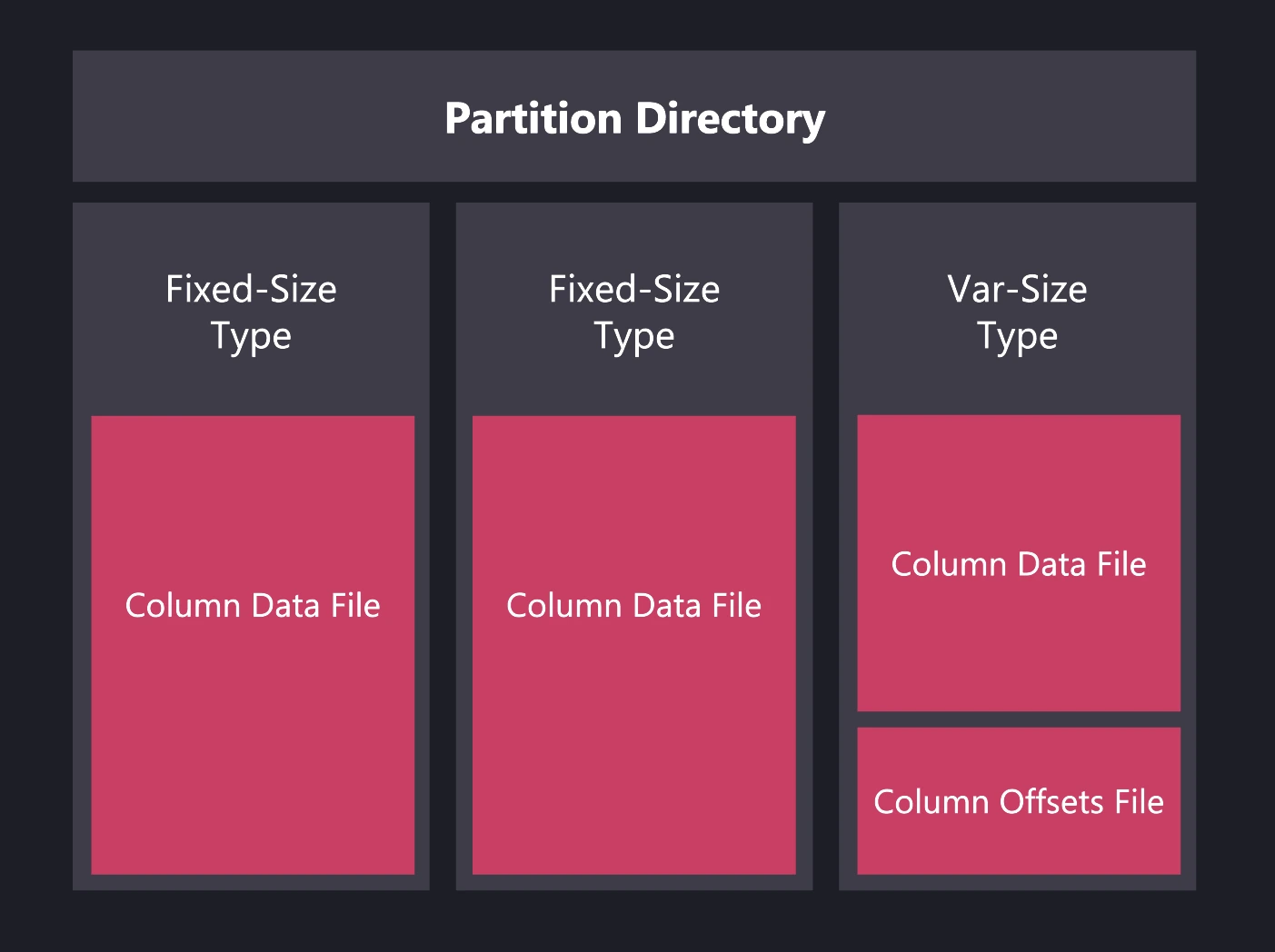
The system stores each table as separate files per column. Fixed-size data types use one file
per column, while variable-size data types (such as
VARCHARorSTRING) use two files per column.
-
CPU optimization: Columnar storage improves CPU use during vectorized operations, which speeds up aggregations and computations.
-
Compression: Uniform data types allow efficient compression that reduces disk space and speeds up reads when ZFS compression is enabled. Parquet files generated by QuestDB use native compression.
Durability
The commit mode decides when written data is flushed from the operating
system's page cache to the disk. The default, nosync, flushes nothing: a
crash of the QuestDB process loses nothing, but an operating system crash or a
power loss can lose recent commits. To protect commits to WAL tables from power
loss, use adaptive commit mode:
cairo.commit.mode=adaptive
Adaptive mode flushes the write-ahead log files of each commit, and flushes the
table files only at periodic save points. After a crash, the start restores each
table to its last save point and replays the WAL after it. With the default
50 ms group-commit window, a power loss can still lose the commits acknowledged
in the last window. sync mode flushes the table files on every commit, which
also protects non-WAL tables but is much slower.
See Durability and commit modes for what each mode survives, the group-commit window, and what adaptive mode costs.
Next up
Continue to Memory Management to learn how QuestDB manages memory and integrates native code.